International
 Finland
 Bangladesh
Introduction
Modern cloud infrastructure demands automation, consistency and reliability. By combining Terraform with GitHub Actions, we can implement a fully automated CI/CD pipeline that provisions and manages AWS environments efficiently. For this exercise, we will focus on creating an AWS infrastructure for hosting a sample web page application using zero touch deployment and Terraform as Infrastructure as Code in a multi-environment setup. The main goal is to automate the deployment pipeline so that any changes could be applied to different environments systematically without manual intervention.
Zero touch deployment will be implemented to ensure that infrastructure can be provisioned, modified and destroyed automatically without manual commands. Terraform will be used to define the AWS resources in a reproducible and version-controlled way. GitHub Actions will automate the CI/CD pipeline so that changes pushed to specific branches would trigger environment-specific deployments.
Besides, it had a function in traditional IT environments to ensure the uniformity of desktops across the deployments, and now in the age of cloud computing, it has been transformed into a key part of infrastructure automation and scalability.
Initial Setup
The first step is installing Git, AWS CLI and Terraform locally to test the setup before automating the deployment pipeline.
Terraform Directory Structure
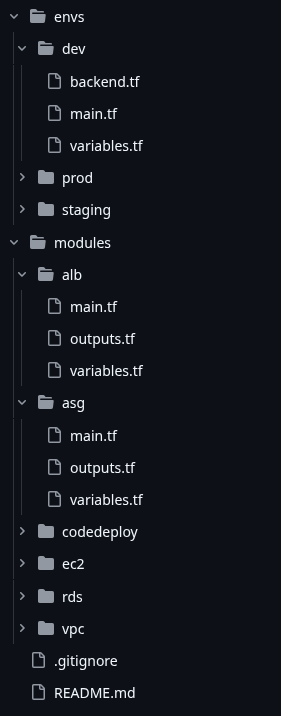
Let’s create a folder named terraform-infra as the main directory. Inside this folder, let’s place two main subfolders: modules and envs.
Modules
Inside modules, let’s create five folders: vpc, ec2, codedeploy, alb and asg. Each module shall contain three files:
- main.tf – It will contain the configuration for the respective AWS resource.
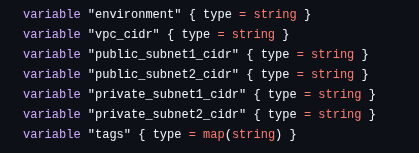
- variables.tf – It will contain all variables that could be reused for different environments.
- outputs.tf – It exposes vital outputs like EC2 instance ID, public IP, etc.
Environments
Inside envs, lets create three folders: dev, staging and prod. Each folder shall contain four files:
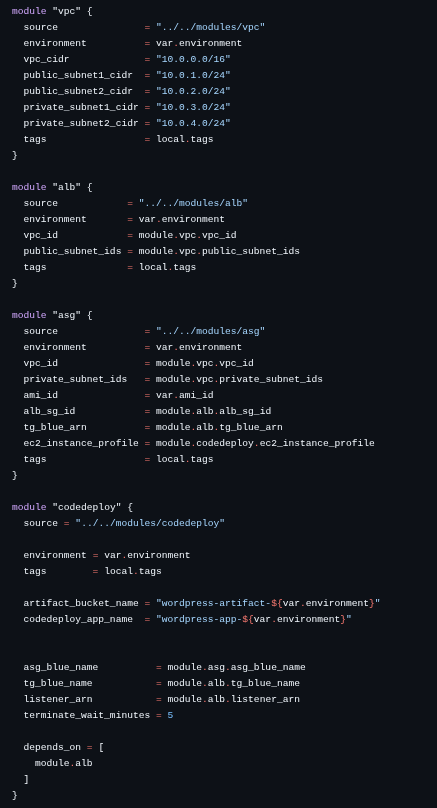
- main.tf – It calls the modules with environment-specific values.
- variables.tf – It defines the environment-specific variables.
- outputs.tf – This file exposes important outputs for the environment after the terraform process completes.
backend.tf – This file initializes the Terraform state in an S3 bucket with separate folders for each environment.
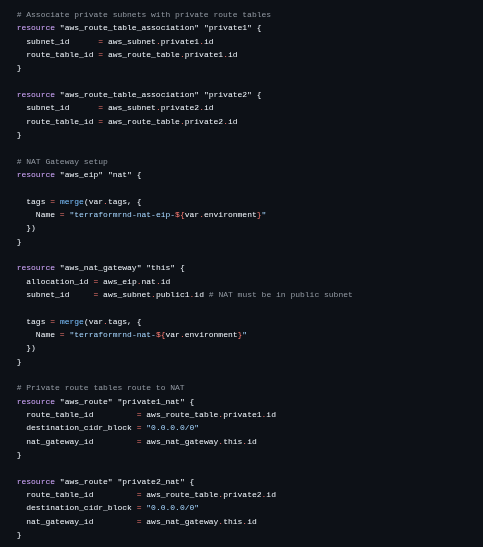
Here are some code snippets:
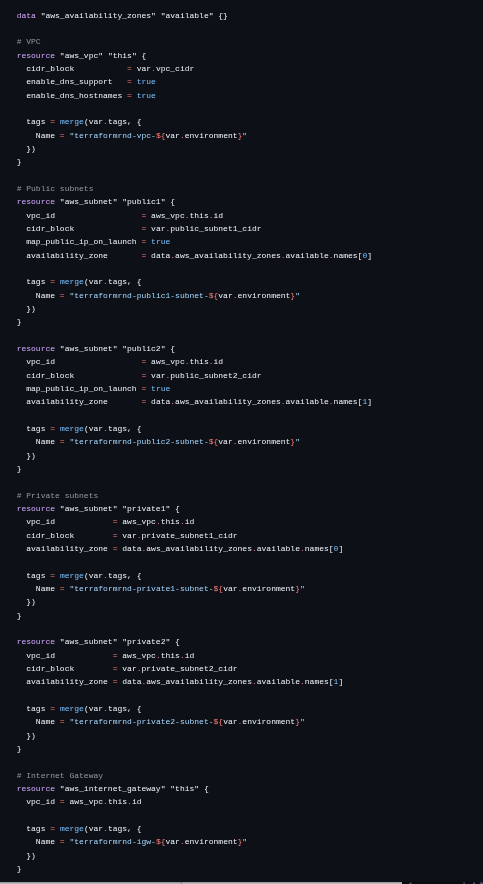
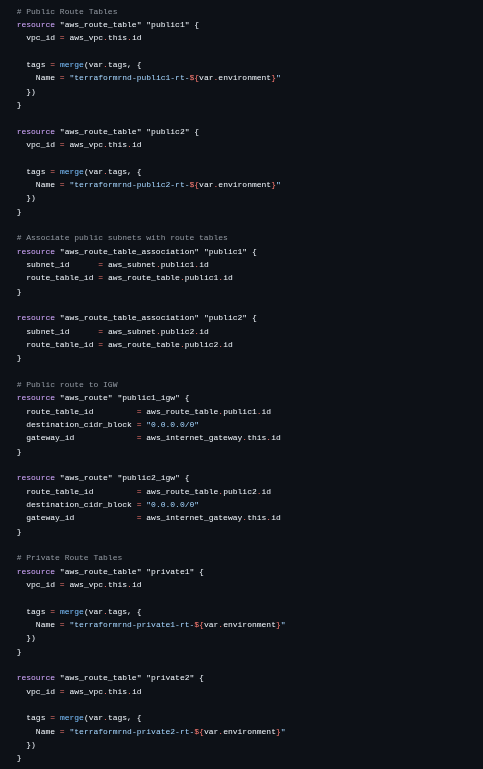
VPC (main.tf)
variables.tf
outputs.tf

Each environment shall have a separate VPC. For dev and staging, the VPCs are created in the us-east-1 region. For prod, the VPC is created in the ap-south-1 region. Public and private subnets are created inside each VPC. ASG instances will be hosted in the private subnets while the ALB is placed in a public subnet.
prod (main.tf)
variables.tf

backend.tf
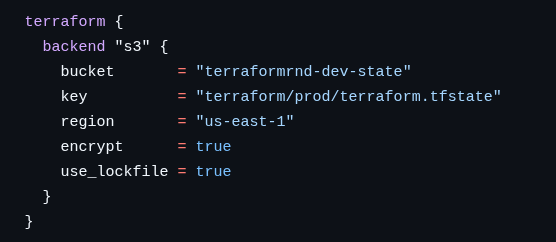
Similarly, the staging and dev environments are configured and the state files for each of the environments are stored in separate directories within the S3 Bucket.
For full reference code, please refer to the following GitHub link:
https://github.com/Rabins-Khanal/terraform-infra.git
Git Repository and CI/CD Setup
Now let’s create a git repository in GitHub so that we can enable version control and proper tracking of our code. Three branches will be created to match the environments:
- dev – Development branch
- staging – Staging branch
- main – Production branch
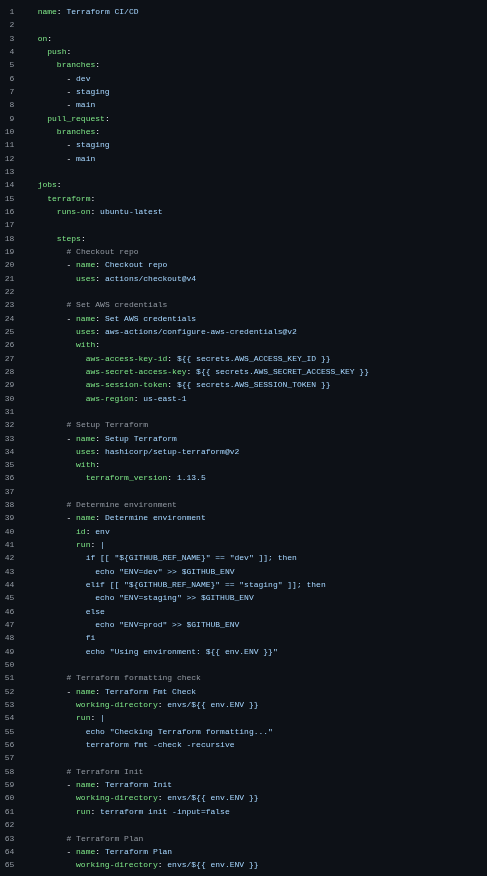
A GitHub Actions workflow file is created at .github/workflows/terraform.yml. The workflow is designed to perform the following actions:
- When changes are pushed to the dev branch, Terraform init, plan and apply will be executed only for the dev environment.
- When changes need to be promoted to staging, the dev branch will be merged into the staging branch and pushed, triggering Terraform to update the staging environment.
- When staging changes are verified, the staging branch will be merged into the main branch and pushed, updating the production environment.
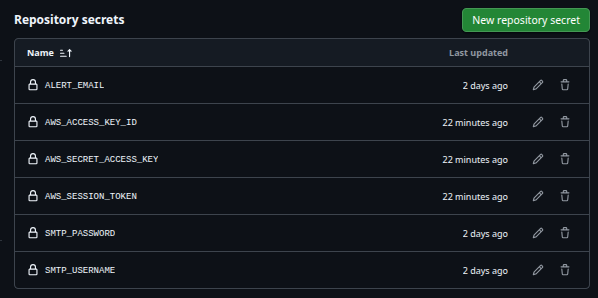
For security, AWS credentials will be stored in GitHub secrets and referenced in the workflow file, ensuring that sensitive information shall not be exposed publicly in the repository.
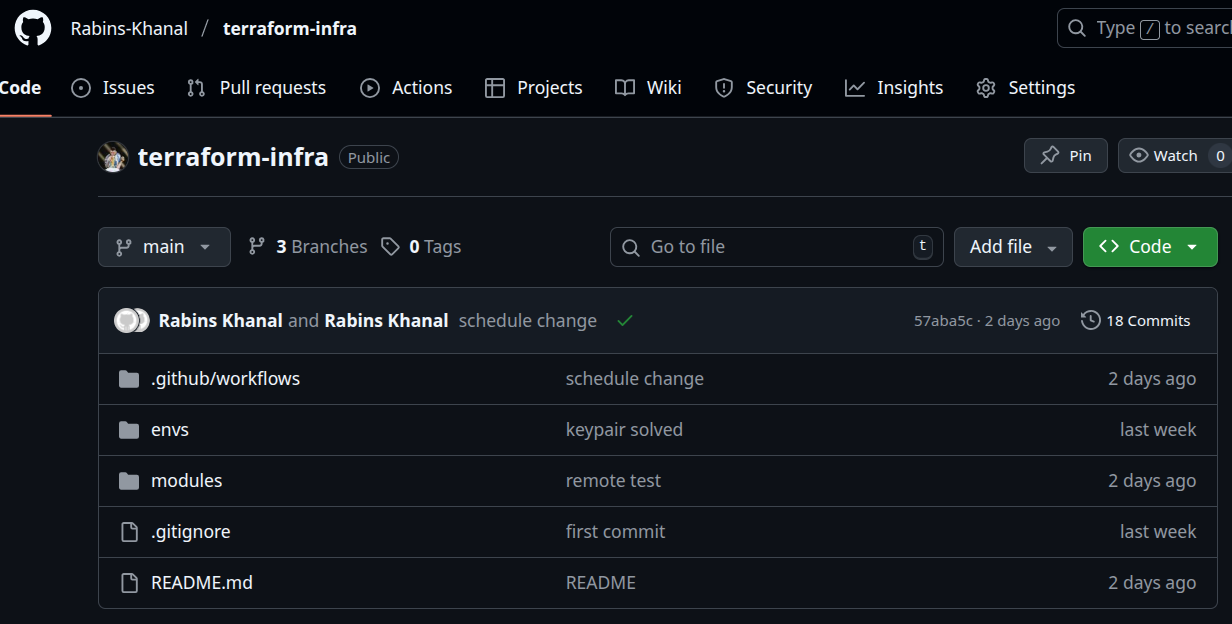
Repo Structure
terraformci-cd.yml
GitHub Secrets
Zero Downtime Deployment Implementation
Zero Downtime on Infrastructure Update
When we talk about zero downtime deployment we need to consider two types of downtime(one when we change the infrastructure code of the instances and the other when we deploy new app code to the production environment).
Lets say I want to change the instance configuration in my ASG, so I make changes to the launch template. In this case, the asg will replace the current instance and create a new one in its place. But if this happens, there will be a time window where our server stops serving traffic. In order to prevent this, we can simply use the lifecycle hook provided by terraform to make sure the asg creates the new instance in place and only when it is up and running will it destroy the old instances. Here is a code snippet that makes sure of it:
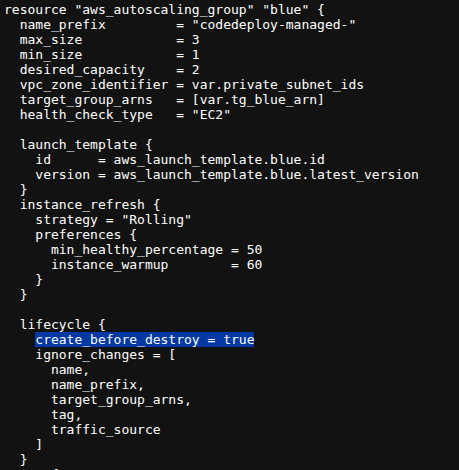
Also, only using the create_before_destroy hook is not enough. We also need to use the instance_refresh block to make sure that when the launch template is updated, the instances are also replaced by the ASG accordingly, otherwise the changes made will only be stored as the new Launch Template version but not applied to the ASG immediately in the next CI/CD run.
Here is how it can be applied:
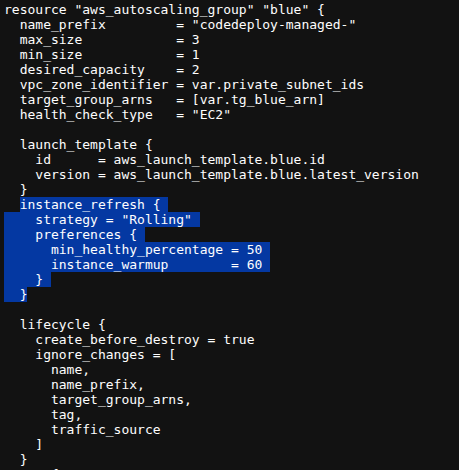
This collaboration between the lifecycle hook and the instance refresh block makes sure that next time the infra config of the asg is changed, no downtime is experienced from the moment the changes apply, to the time all modified instances are up and serving traffic.
Zero Downtime during deployment (Blue-Green)
Lets say I want to upload a new app code to my production environment and send a chunk of traffic to that environment but keep serving traffic to my old server too until the new server is healthy and works perfectly. In this case, the industry choice is to use the Blue-Green deployment strategy to make sure that there is absolutely no downtime during the transition.
This approach allows new versions of the application to be deployed without affecting the currently running environment, ensuring uninterrupted service.
Application Load Balancer
Let’s provision an Application Load Balancer (ALB) to route incoming traffic through the target group to both the environments during deployment. Initially:
- Target Group: Hosts the currently active production instances.
The ALB listener is configured to forward all traffic to the target group.
Auto Scaling Groups and Launch Templates
- Blue ASG: Manages the existing production EC2 instances.
- Green ASG: Created dynamically only when a new version of the application is deployed.
Both ASGs use the same launch templates specifying the EC2 AMI, instance type, user data for LAMP stack setup and associated security groups. Multiple private subnets across availability zones are used to ensure high availability. The green ASG is created dynamically when the codedeploy attempts to deploy the newer version of the application by pulling the app artifact from a S3 bucket which contains the latest zipped app code uploaded from a github repository.
How the deployment happens through code deploy
When the CI/CD workflow is triggered with a push on the main branch of the app-code repo, the deployment process starts. The appspec.yml :
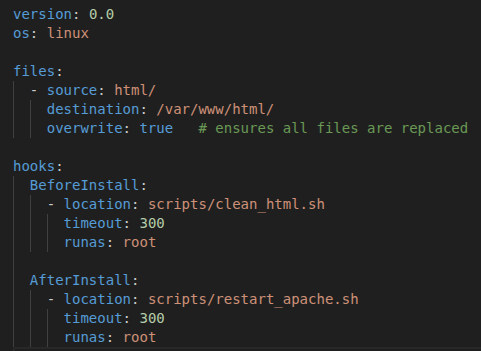
The clean_html.sh is responsible to clean any files or content that may be in the desired path where the code is to be deployed and the restart_apache.sh is responsible to restart the apache server so that it can serve the new content.
The workflow(deploy.yml) for the app code:
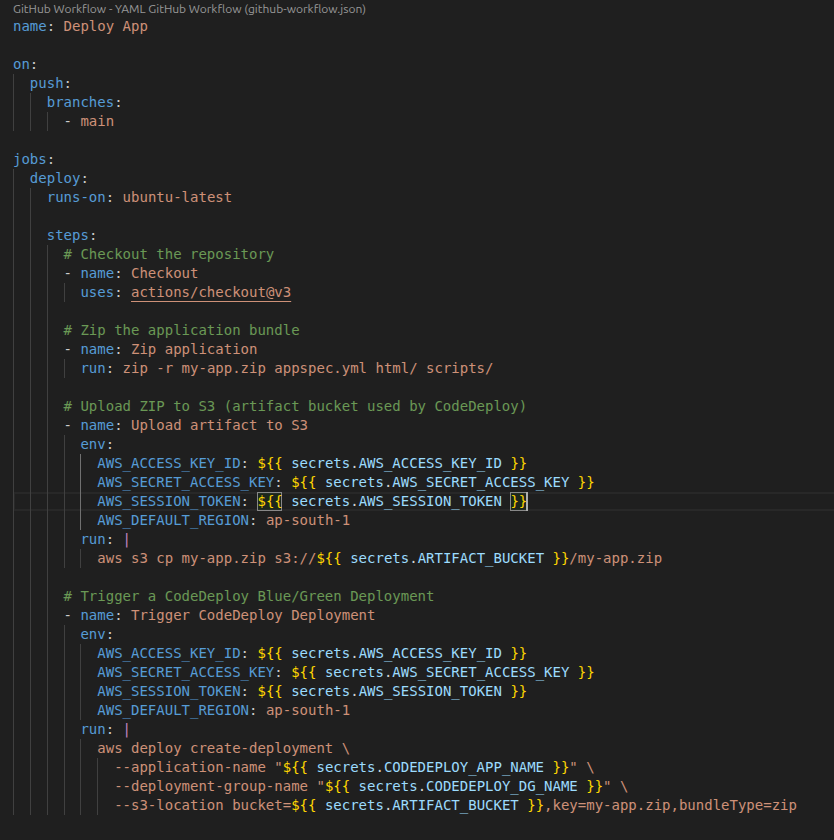
Here an index.html has been used for testing purposes. The workflow basically zips the latest app code in the main branch, uploads it to the S3 bucket specified and code deploy handles the entire deployment process using the deployment group configured.
The deployment app, artifact bucket and the deployment group are all provisioned using Terraform considering they are the part of the infrastructure.
The codedeploy agent also requires many permissions in order to be able to handle the deployment within the AWS environment. Let’s create a role named “codedeploy-role” with the following permissions.
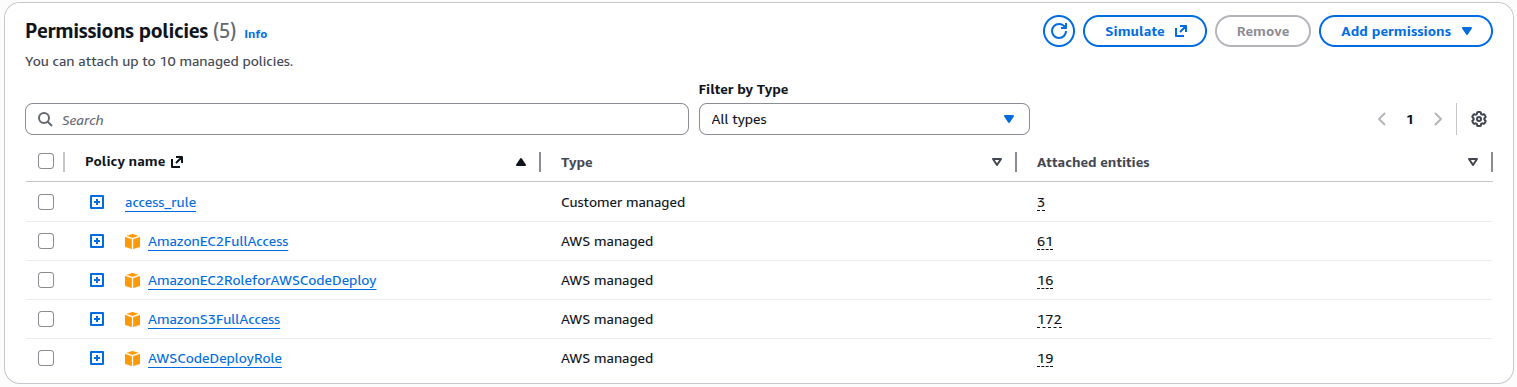
Deployment Workflow
The zero-downtime deployment process works as follows:
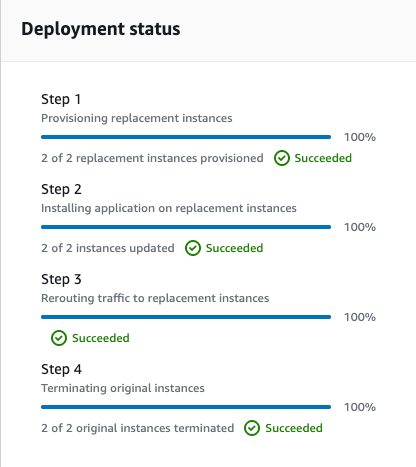
State Manipulation in Terraform
Terraform provides various commands like state import,mv,rm,push and pull so that we can maintain the state file in a way that we want to align it with the real infrastructure.
Use of state manipulation to sync the latest ASG with Terraform
Once the new ASG is deployed by the codedeploy, a new problem is introduced. The ASG was handled and deployed by cloning the existing ASG (the one created by Terraform). So, the new cloned ASG is not recognized by Terraform as it was created by an external agent. Here we need to manipulate the state of Terraform in such a way that, when the terraform code runs the next time, Terraform must think that the latest ASG is the one that it is controlling. In order to do this, we will use the state manipulation tactic.
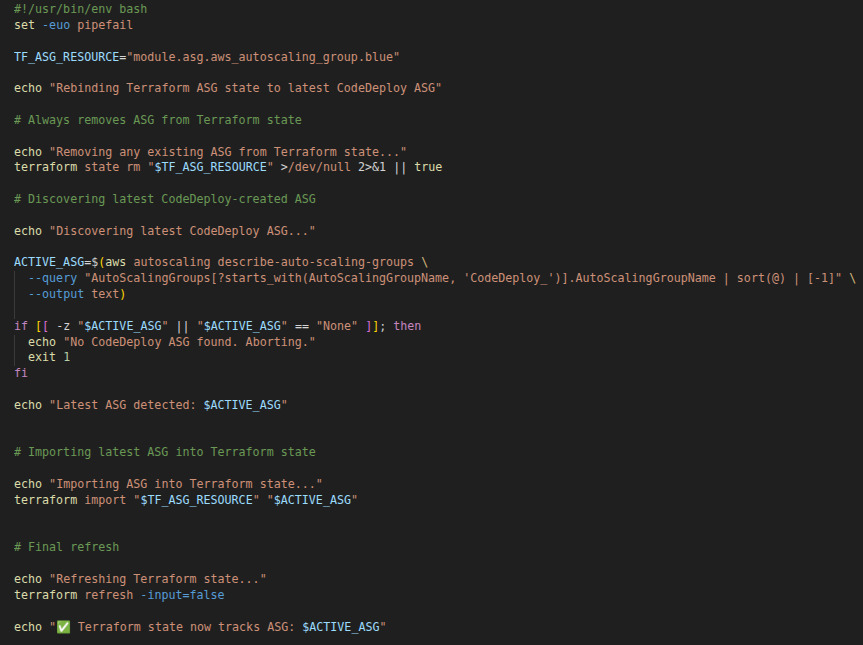
In this use case, the rm and import commands have been used to successfully map the terraform state with the latest existing ASG created by codedeploy after blue green deployment. This file is run as a part of the CI/CD when the blue green deployment is successful and the blue ASG is terminated.
Conclusion
In this blog, we learned how Terraform and GitHub Actions can be combined to build a fully automated CI/CD pipeline for AWS infrastructure and deploy a sample application. By implementing multi-environment deployments, remote state management and zero-downtime deployment strategies, we created a reliable and scalable infrastructure workflow. We shall know about the best industry practices in the next part.