International
 Finland
 Bangladesh
AWS DevOps Agent | The Next Evolution of Cloud Operations
1. Introduction
Cloud operations have changed drastically in the past decade. We went from manual infrastructure provisioning to Infrastructure as Code, then CI/CD pipelines, and lately GitOps. But DevOps teams still can’t keep up. Cloud environments have gotten so complex that traditional automation doesn’t cut it anymore.
Think about a typical cloud architecture now. Hundreds of microservices, serverless functions, managed databases, and interconnected AWS services all talking to each other. When something breaks, engineers correlate signals across CloudWatch metrics, X-Ray traces, application logs, and security findings. During a production outage, every second counts. But diagnosing root causes across this distributed architecture can turn a 15-minute incident into a two-hour ordeal.
AI-powered DevOps agents change this. Unlike traditional automation that follows predefined rules, AI agents reason about complex problems. They investigate incidents autonomously and take action based on context. AWS DevOps Agent (currently in public preview) combines large language model reasoning with secure access to your AWS infrastructure and observability data.
In this article, I’ll walk through how AI DevOps agents are changing cloud operations on AWS, the architecture patterns you need to know, and what you should think about before running them in production.
2. What Makes DevOps Agents Different
Let’s be clear about what makes AI agents different from automation tools you already use.
Traditional scripts execute predefined steps. An AWS Lambda function that stops unused EC2 instances follows explicit logic: if instance.tags[‘Environment’] == ‘dev’ and uptime > 8 hours, then stop instance. These work fine but they’re inflexible. They can’t handle anything outside their programmed rules.
Infrastructure as Code tools like CloudFormation and Terraform codify infrastructure state. You get consistency and repeatability, but humans still design the architecture and troubleshoot when deployments fail.
CI/CD pipelines like CodePipeline automate software delivery through predefined stages. They can incorporate conditional logic and approval gates, but they can’t debug why a deployment failed or optimize themselves.
AI agents are different. They perceive their environment (observability data, logs, metrics), reason about problems using large language models, plan multi-step solutions, and execute actions through APIs. Agents operate with varying levels of autonomy, from fully autonomous remediation to human-in-the-loop approval workflows.
Instead of pattern matching, agents use foundation models to understand what log messages, error traces, and metric anomalies actually mean. When investigating a Lambda function with high CPU, an agent doesn’t just check predefined thresholds. It correlates deployment timing, recent code changes, dependency updates, and historical performance patterns.
Agents can execute complex investigation workflows on their own. For unexpected EC2 costs, an agent might describe all running instances, analyze uptime patterns, check scheduling tags, compare runtime against expected business hours, identify tag case sensitivity issues, and generate remediation steps, all without human intervention until presenting findings.
3. Why Cloud Operations Need This Now
The case for AI DevOps agents becomes obvious when you look at operational challenges facing cloud teams today.
A typical enterprise AWS environment might have 500+ microservices across multiple VPCs and regions, thousands of Lambda functions, ECS and EKS clusters with hundreds of containers, and various databases. When a customer-facing issue happens, identifying the root cause means correlating signals across this entire landscape. Traditional monitoring tells you what is wrong but not why. Human operators manually investigate, checking CloudWatch Logs Insights, examining X-Ray service maps, reviewing recent deployments in CodePipeline, and consulting Config for infrastructure changes.
This work takes time, is error-prone, and doesn’t scale.
SRE teams spend too much time on toil. Repetitive, manual work that doesn’t add lasting value. Investigating why EC2 instances aren’t following their start/stop schedules. Analyzing CloudWatch alarms to figure out if they’re real issues or false positives. Reviewing Trusted Advisor recommendations. Correlating Security Hub findings across accounts. Debugging failed CodePipeline executions.
During production incidents, speed matters. Yet incident response usually goes: alert fires in CloudWatch, on-call engineer gets paged, engineer logs into AWS Console and checks multiple services, engineer correlates timeline of changes, engineer hypothesizes root cause and searches runbooks, engineer implements fix and monitors recovery.
The delay between getting paged and identifying the root cause is where AI agents add value. An agent can start investigating immediately when an alert fires, checking system state, analyzing logs, consulting historical incidents, and often identifying root cause before a human engineer even joins the call.
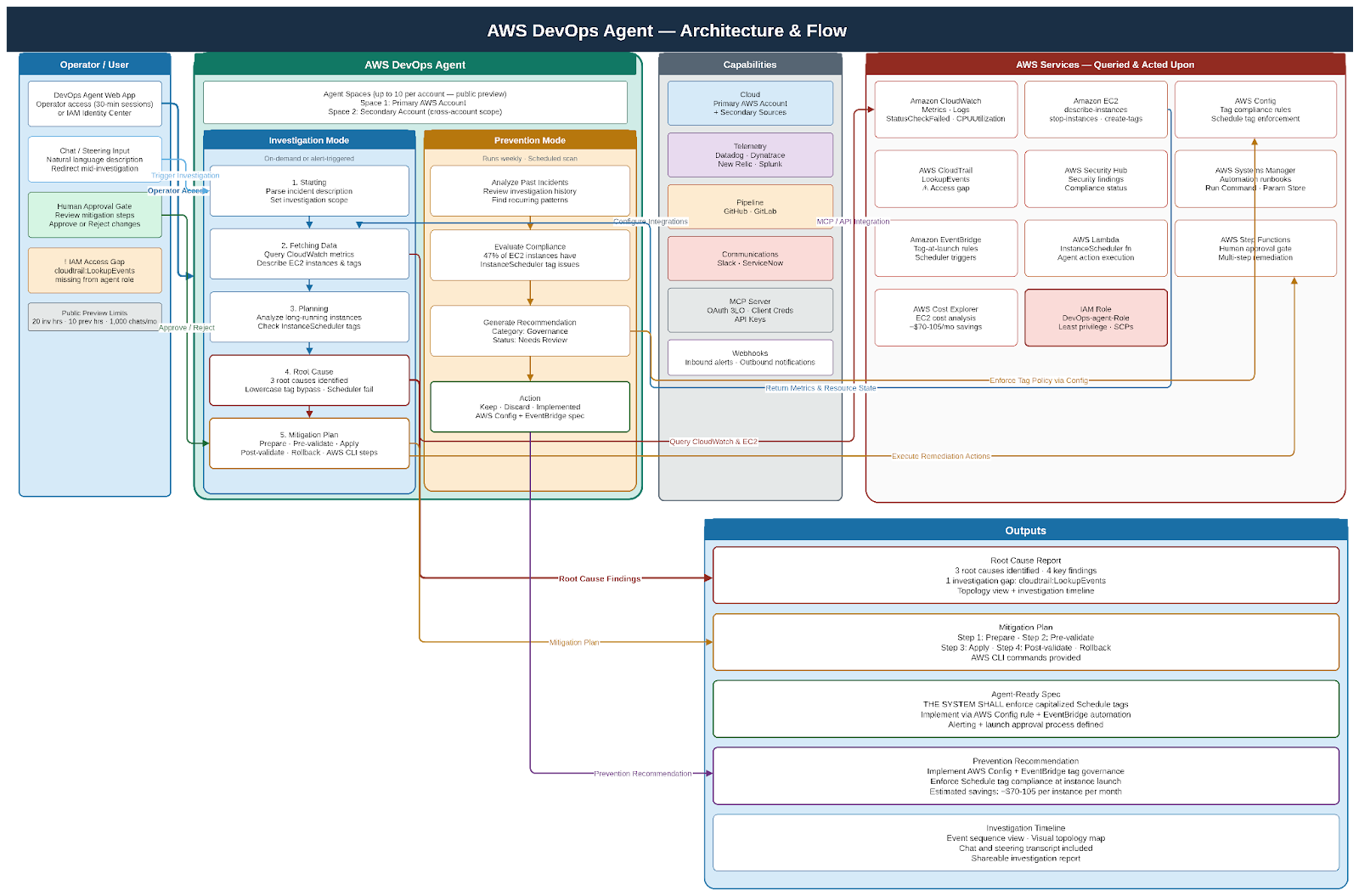
AWS DevOps Agent demonstrates this well. Give it an incident description like “lambda function exhibiting high CPU utilization,” and it executes an investigation workflow: understanding time context, identifying specific resources, checking metrics, and ultimately identifying issues like EC2 instances running continuously due to misconfigured tags that InstanceScheduler can’t recognize (case sensitivity problem with lowercase ‘schedule’ vs capitalized ‘Schedule’).
4. DevOps Agent Use Cases on AWS
Use case 1 : Intelligent Incident Triage and Root Cause Analysis
Scenario: A CloudWatch alarm fires for elevated error rates in a customer-facing API running on Lambda.
Traditional approach: on-call engineer gets paged, logs into AWS Console, checks CloudWatch metrics, searches logs, examines X-Ray traces, reviews recent CodePipeline deployments, hypothesizes root cause. This takes 15-30 minutes.
Agent-driven approach: CloudWatch alarm triggers EventBridge rule that invokes agent Step Functions workflow. Agent analyzes CloudWatch metrics to characterize the anomaly (which endpoints, error types, geographic distribution), queries CloudWatch Logs Insights for error messages and stack traces, examines X-Ray service maps to identify failing downstream dependencies, checks Config for infrastructure changes in the past hour, queries DynamoDB for similar historical incidents, synthesizes findings using Bedrock, and presents findings to on-call team via Slack including rollback procedure.
This investigation completes in under two minutes.
Use Case 2: Self-Healing Infrastructure with Autonomous Remediation
Scenario: EC2 instances are racking up unexpected costs because they’re running continuously instead of following scheduled start/stop patterns.
Traditional approach: cost anomaly detected in Cost Explorer, finance emails engineering, engineer manually investigates instances, discovers InstanceScheduler isn’t working, identifies case-sensitive tag issue, manually corrects tags.
Agent-driven approach (based on AWS DevOps Agent preview): Agent monitors Cost and Usage Reports daily, detects EC2 cost anomaly for specific account/region, executes investigation by describing all EC2 instances and analyzing uptime patterns using CloudWatch metrics, identifies instances with “schedule: NP-office” tags (lowercase) that aren’t being managed by InstanceScheduler, cross-references with InstanceScheduler configuration and sees it only recognizes capitalized “Schedule” tags, presents findings with three risk-assessed options (stop instances immediately for high impact/immediate savings, correct tags for no immediate impact but enables scheduler next cycle, or schedule maintenance window to update tags and validate), engineering team approves the tag correction option, agent updates instance tags using Systems Manager, monitors next scheduling cycle to validate remediation, and generates incident report documenting root cause and prevention.
This demonstrates how agents don’t just detect issues; they investigate thoroughly, understand tool-specific quirks like case sensitivity, and present contextualized options instead of blindly executing fixes.
Use Case 3: Cost Optimization Through Intelligent Analysis
Agent runs weekly analysis workflow triggered by EventBridge Scheduler. It queries Cost and Usage Reports to identify top spending, analyzes EC2 Reserved Instance and Savings Plans utilization, examines EBS volumes for unused/unattached resources, reviews CloudWatch metrics to identify underutilized resources, checks Compute Optimizer recommendations, consults Trusted Advisor for optimization opportunities, and synthesizes findings into prioritized recommendations with estimated savings and implementation complexity.
For low-risk optimizations like deleting unattached EBS volumes, it implements changes automatically. For higher-risk changes like instance rightsizing, it presents recommendations with business context to cloud FinOps team.
The agent maintains a knowledge base of past optimizations, their results, and any issues encountered along with continuously improving recommendation quality.
Use Case 4: Security Remediation Automation
Security Hub findings trigger EventBridge rules for high-severity issues. The agent categorizes findings by type (exposed resources, vulnerable configurations, compliance violations). For each finding, it determines affected resources using Config, checks if similar findings were previously remediated and their outcomes, consults Security Hub remediation guidance, and assesses blast radius and business impact.
For low-risk remediations (closing unused security group rules, enabling encryption), agents execute fixes automatically via Systems Manager Automation. For high-risk remediations (modifying production security groups), agents draft detailed remediation plans and request approval via ServiceNow. Agent tracks remediation status in Security Hub, updates ticketing systems, and generates compliance reports showing finding trends and mean-time-to-remediation.
This cuts security response time from days to minutes for routine findings while keeping human oversight for potentially disruptive changes.
Use Case 5 : Proactive Reliability Engineering
Agent continuously monitors CloudWatch metrics, X-Ray error rates, and Health events. It applies anomaly detection to identify early warning signals like gradually increasing latency, slow-growing error rates, or resource consumption trends. When potential issues are detected, agent investigates by correlating timing with recent deployments, analyzing resource capacity headroom, checking for approaching AWS service quotas, and reviewing scheduled maintenance events.
The agent generates proactive recommendations like “ECS task CPU approaching 80% consistently, recommends scaling up to maintain headroom before Black Friday traffic” or “RDS storage at 75% capacity, current growth rate suggests capacity exhaustion in 14 days.”
This shifts operations from reactive firefighting to proactive reliability engineering.
5. Getting Started
DevOps agents on AWS are not experimental. The underlying services are production-ready. The architecture patterns are documented. AWS DevOps Agent is available in public preview today.
What most teams do not need is a full organizational transformation before they start. The better approach is a narrow, high-value use case with clear success criteria. It is always recommended to use a phased approach.
Phase 1 (Months 1-3): Deploy agents with no remediation permissions. Focus on incident triage and root cause analysis. The agent receives alerts but only investigates and reports findings. Engineering teams review agent reports and manually implement fixes. Build a knowledge base of incident patterns.
Success metrics: agent identification of root cause in synthetic and real incidents, reduction in mean-time-to-understand.
Phase 2 (Months 4-6): Enable agents to remediate low-impact scenarios automatically. Cleaning up unattached EBS volumes. Stopping non-production instances outside business hours. All actions have human review for the first 2 weeks, then move to automatic execution with notification.
Success metrics: reduction in operational toil, cost savings, zero incidents caused by agent actions.
Phase 3 (Months 7-9): Extend agent capabilities to production resources with mandatory approval gates. Agent investigates production incidents, proposes remediation plan with risk assessment, human approves or rejects, agent executes approved remediation.
Success metrics: reduction in mean-time-to-recovery, percentage of incidents where agents correctly identified root cause.
Phase 4 (Months 10+): For well-established patterns where the agent has proven reliability, enable autonomous remediation for specific scenarios. Maintain human approval for novel or high-impact scenarios.
Success metrics: percentage of incidents resolved without human intervention, operational efficiency gains.
Throughout all phases, maintain comprehensive audit logging, regular review of agent decisions, and clear rollback procedures.
6. Conclusion
AI DevOps agents are a real shift in cloud operations. From rule-based automation to reasoning systems that can investigate, plan, and act with contextual understanding. AWS has a solid platform for building these systems, from Bedrock’s foundation model capabilities to the extensive ecosystem for execution, observability, and governance.
The benefits are real: faster incident resolution, less operational toil, proactive reliability engineering, and operational efficiency that scales with cloud complexity. AWS DevOps Agent’s public preview shows these capabilities in practice.
But success takes more than deploying technology. You need robust governance frameworks, comprehensive audit logging, clear approval workflows, and institutional knowledge bases that agents can reference. The roadmap should be phased: start with investigation-only agents, prove value in low-risk scenarios, gradually extend to production remediations with human oversight.
Organizations that start exploring AI DevOps agents today will have significant operational advantages. As cloud environments keep growing in complexity, agent-driven operations will shift from a competitive advantage to an operational necessity.
The future of DevOps isn’t about replacing human engineers with AI. It’s about augmenting human expertise with AI that handles repetitive investigation, enables faster incident response, and frees engineering teams to focus on strategic work. On AWS, the infrastructure to build that future exists today
Further Reading
AWS DevOps Agent Documentation: https://docs.aws.amazon.com/devopsagent/latest/userguide/
Amazon Bedrock Agents: https://docs.aws.amazon.com/bedrock/latest/userguide/agents.html
AWS Well-Architected Framework, Operational Excellence Pillar: https://docs.aws.amazon.com/wellarchitected/latest/operational-excellence-pillar/
AWS Systems Manager Automation: https://docs.aws.amazon.com/systems-manager/latest/userguide/systems-manager-automation.html